Thursday, July 30, 2009

ADO.NET Data Services – 1.5 CTP1


Finally got a chance to try out this new preview. Here is a snippet that puts a simplified customers list in an atom feed. This was really quick. The only thing I had to do was to update internet explorer because I was using a XP virtual machine :).

   1: namespace DemoServerSite
   2: {
   3:     public class Customer
   4:     {
   5:         public int ID { get; set; }
   6:         public string Name {get;set;}
   7:         public string Code {get;set;}
   8:         public string Street {get;set;}
   9:         public string Country {get;set;}
  10:         public string PostalCode {get;set;}
  11:         public string FiscalId {get;set;}
  12:     }
  13:  
  14:  
  15:     public class CustomersDataContext
  16:     {
  17:         private List<Customer> source;
  18:  
  19:         public CustomersDataContext()
  20:         {
  21:             source = new List<Customer>();
  22:             source.Add(new Customer {ID=0, Name = "Jose", Code = "C0001" });
  23:             source.Add(new Customer {ID =1, Name = "Maria", Code = "C0002" });
  24:         }
  25:  
  26:         public IQueryable<Customer> Customers
  27:         {
  28:             get
  29:             {
  30:                 return this.source.AsQueryable();
  31:             }
  32:         }
  33:     }
  34:  
  35:     public class WebDataService1 : DataService<CustomersDataContext>
  36:     {        
  37:         // This method is called only once to initialize service-wide policies.
  38:         public static void InitializeService(IDataServiceConfiguration2 config)
  39:         {
  40:             // TODO: set rules to indicate which entity sets and service operations are visible, updatable, etc.
  41:             // Examples:
  42:             config.SetEntitySetAccessRule("*", EntitySetRights.AllRead);
  43:             config.SetServiceOperationAccessRule("*", ServiceOperationRights.All);
  44:         }
  45:     }
  46: }

This new technology seems to promise because it is really lightweight. Integrates nicely with entity framework and we can tune the behavior by using interceptors. I’ll try to publish some examples of that soon.

Have fun,

Wednesday, July 29, 2009

Building WCF Custom Channels – A channel project template


I am in the process of learning in-depth how to write channels for WCF. One of the hard things was getting an idea of the parts we have to build to achieve this goal.

In this process I built this simple template that contains the major parts and a getting started client/server example to debug it and get it running. If you hit F5 you will get a NotImplementedException and my process is to implement each method as it get called and throws. This seams like a good way of learning how the stack is organized and in what sequence things happen.

This was built by stripping out all the code of the NullTransport project here by Roman Kiss. So all credits go to him :).

Download it here.

Have fun,

Thursday, June 25, 2009

A good article on the changes from the 32 bit address space to 64 bits.

Related to the previous article on hacking visual studio to get rid of the 2Gb limit on user process virtual memory there is a good article from Mark Russinovich that explains what this setting (in the bootloader) does and how the memory looks like when you have a processor and OS that supports a 64bit address space:

http://blogs.technet.com/markrussinovich/archive/2008/11/17/3155406.aspx

Reducing the out of memory errors in Visual Studio

I was getting a lot of OutOfMemory or NotEnoughStorage errors in visual studio when developing with large projects. It seems that this is a known memory problem. I follow the instructions on this post and with the 3Gb I have on my laptop it improved a lot. If you are experiencing the same here is the link:

http://stevenharman.net/blog/archive/2008/04/29/hacking-visual-studio-to-use-more-than-2gigabytes-of-memory.aspx

Happy coding,

Tuesday, June 16, 2009

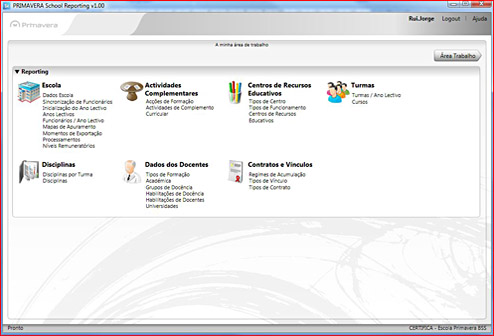
Primavera School Reporting - First product on the platform we have been developing in Primavera

After a couple of years of work on a modeling platform where I have been contributing in the areas of architecture, business patterns and service orientation the first product is out:

http://www.primaverabss.com/pt/PortalRender.aspx?PageID={8f4a9168-49ed-407d-9b60-8656e1ec2256}

Here is a quick look on it.

The announcement is only available in Portuguese as this is a product that applies only to Portuguese legislation.

This is a state of the art product with all the latest .NET 3.5 technologies in and is based on MDD principles.

Friday, June 5, 2009

Windows Azure Configuration for Microsoft Sample Storage Client

Another quick note on Windows Azure that made me loose some time.

The urls of the three storages, Table, Blob and Queue must be given without the account name:

   1: <ConfigurationSettings>
   2:   <Setting name="AccountName"
   3:      value="youraccounthere"/>
   4:  
   5:   <Setting name="AccountSharedKey"
   6:            value="yourprimarykeyhere"/>
   7:  
   8:   <Setting name="TableStorageEndpoint"
   9:            value="http://table.core.windows.net/"/>
  10:  
  11:   <Setting name="BlobStorageEndpoint"
  12:            value="http://blob.core.windows.net/"/>
  13:  
  14:   <Setting name="QueueStorageEndpoint"
  15:            value="http://queue.core.windows.net/"/>
  16: </ConfigurationSettings>

What you will see on the portal is something like http://youraccount.table.core.windows.net and copying that string will not work with the code as is.

Thursday, June 4, 2009

Windows Azure - TableNotFound

I got this error while trying out Windows Azure after deploying to the cloud fabrik. When testing locally we use the option shown on the picture bellow but on the cloud that is not required.

AzureCreateTestTablesMenu

My problem was that I was not calling the initialization code that creates the tables in the storage. This is not required locally. The recommend initialization for the cloud is demonstrated in this video:

Store Data in Windows Azure Tables

The initialization is done in the Global.axax in the BeginRequest event handler. My looks like this:

   1: protected void Application_BeginRequest(object sender, EventArgs e)
   2: {
   3:     HttpApplication app = (HttpApplication)sender;
   4:     HttpContext context = app.Context;
   5:     FirstRequestInitialization.Initialize(context);
   6: }

And the FirstRequestInitialization class looks like this:

   1: class FirstRequestInitialization
   2: {
   3:     private static bool s_InitializedAlready = false;
   4:     private static Object s_lock = new Object();
   5:  
   6:     public static void Initialize(HttpContext context)
   7:     {
   8:         if (s_InitializedAlready)
   9:         {
  10:             return;
  11:         }
  12:         lock (s_lock)
  13:         {
  14:             if (s_InitializedAlready)
  15:             {
  16:                 return;
  17:             }
  18:  
  19:             ApplicationStartUponFirstRequest(context);
  20:             s_InitializedAlready = true;
  21:         }
  22:     }
  23:  
  24:     private static void ApplicationStartUponFirstRequest(HttpContext context)
  25:     {
  26:         StorageAccountInfo accountInfo =
  27:             StorageAccountInfo.GetDefaultTableStorageAccountFromConfiguration();
  28:         
  29:         TableStorage.CreateTablesFromModel(typeof(BrandTable), accountInfo);
  30:         // other tables here...
  31:     }
  32: }

Basically what this code does is to read the configuration from the configuration file and create each required table. If you get this error and you are using this method you forgot to add a call to the CreateTablesFromModel with the missing table.